
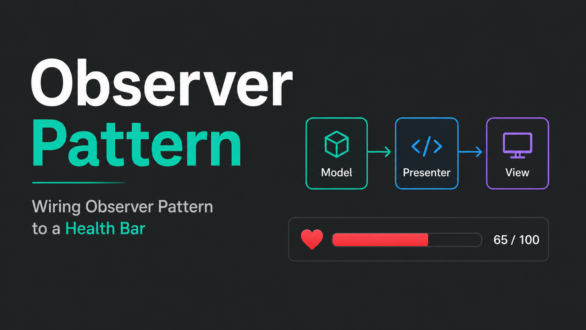
I almost didn’t need Observer pattern for this. A health bar is small — one int, one slider, one button. It would have been faster to just call view.SetSliderValue() directly from wherever health changes.
That’s exactly the problem. “Wherever health changes” turns out to be more than one place the moment you add a second damage source, a regen tick, or a death-screen check. Either the Presenter polls the Model every frame to see if anything changed, or every place that modifies health remembers to also call the View manually. Both age badly. The first wastes cycles checking a value that usually hasn’t moved. The second means the moment someone adds a new way to take damage, they also have to remember the UI call — and eventually someone won’t.
So instead of the Model getting asked about its state, I made it announce changes when they happen.
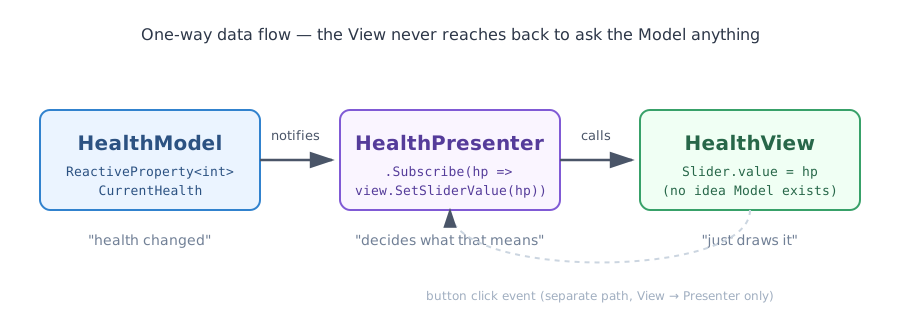
One direction carries data down. A single, separate line carries intent back up, from the button click. That asymmetry is the whole point of MVP layered under Observer — the View never reaches into the Model, and the Model never touches the View directly. Everything routes through the Presenter, and the Presenter itself doesn’t decide when to check — it just reacts when told.
public class HealthModel
{
    public readonly ReactiveProperty<int> CurrentHealth = new ReactiveProperty<int>(100);
    public readonly int MaxHealth = 100;

    public void TakeDamage(int amount)
    {
        CurrentHealth.Value = Mathf.Max(0, CurrentHealth.Value - amount);
    }
}
ReactiveProperty<int> isn’t just an int with extra steps. Setting .Value is the notification — nothing downstream has to poll it, and nothing upstream has to remember to announce it separately. That distinction matters more than it looks: the Model doesn’t know or care who’s listening. It could be zero subscribers, one, or five. It just changes and moves on.
model.CurrentHealth
    .Subscribe(hp => view.SetSliderValue(hp))
    .AddTo(this);

model.CurrentHealth
    .Where(hp => hp <= 0)
    .Subscribe(_ => view.ShowDeathScreen())
    .AddTo(this);
This is where Observer actually earns its keep over a plain callback. Two separate concerns — “update the visible number” and “check if the player died” — watch the exact same stream without knowing about each other. Adding a third reaction later (a low-health screen shake, a UI color warning) means adding a third Subscribe, not editing the first two.
.AddTo(this) ties each subscription’s lifetime to the GameObject — no manual unsubscribe list to maintain, no risk of a stale listener firing after the object’s gone.
Honestly, either version works fine at this size. The real difference shows up once the condition list grows — Where extends cleanly by adding another operator, while the if version means nesting or juggling flags.
view.SetSliderValue(model.CurrentHealth.Value);   // this line, right here
view.OnDamageButtonClicked += HandleDamageButtonClicked;

model.CurrentHealth
    .Subscribe(hp => view.SetSliderValue(hp))
    .AddTo(this);
ReactiveProperty.Subscribe() fires immediately with the current value the moment you subscribe. Which means that first line — manually pushing the starting health into the view — is technically dead weight. The subscription below it does the same job on its own.
I left it in anyway. Not because I didn’t notice, but because reading this file six months from now, I want the initial UI state to be an explicit, visible line — not an implicit side-effect of a subscription order that’s easy to misread at a glance. A redundant line that documents intent is a fair trade against a “clean” one that requires knowing a library quirk to parse correctly.
public interface IHealthView
{
    void SetSliderValue(int currentHealth);
    void ShowDeathScreen();
    event Action OnDamageButtonClicked;
}
The interface is doing quiet work here. It’s not just abstraction for its own sake — it means the Presenter depends on “something that can display health,” not on a specific MonoBehaviour. Swap the UI entirely, and nothing above this line has to change.
The View never asks “is health low?” or “should I show the death screen?” It just gets told, on the Presenter’s terms. That boundary — Views react, they don’t decide — is the same one that shows up in production reactive systems handling much larger data flows. A health bar is just small enough to see the whole shape at once.
The snippets above are trimmed for context. Full working source — HealthModel.cs, IHealthView.cs, HealthView.cs, HealthPresenter.cs, usings and all — is on GitHub:https://github.com/tadakuniyasuda/ue5-draw-call-and-ui-tests