
If you catch OperationCanceledException in a UniTask step and don’t re-throw it, the rest of the chain keeps running and the whole sequence reports success. I’d read that rule many times, but I wanted to see it happen in my own console, with timestamps and frame numbers as evidence.
This post is the record of that experiment: a 3-step async sequence, a Cancel button, and eight runs comparing a buggy step against a correct one.
One MonoBehaviour runs three simulated steps, each a 2-second UniTask.Delay: Connecting, Downloading, Finishing. UI buttons start a sequence, and a Cancel button calls Cancel() on a CancellationTokenSource.
Every log line is stamped with seconds since the run started and the current frame number. That stamp is the evidence for everything below.
private string Stamp(string msg)
    => $"[{Time.realtimeSinceStartup - _runStartTime:F2}s | f{Time.frameCount}] {msg}";
The two step versions differ by a single line. The buggy one logs the cancellation and returns normally:
catch (OperationCanceledException)
{
    LogWarning($"Step {step}: cancelled -> SWALLOWED (method returns normally)");
    // No re-throw: the caller thinks this step succeeded.
}
The correct one logs it and re-throws:
catch (OperationCanceledException)
{
    LogWarning($"Step {step}: cancelled -> cleaning up, then RE-THROWING");
    if (ct.IsCancellationRequested) throw;
}
A single top-level method decides the outcome. It logs COMPLETED if the sequence returns, or ABORTED if an OperationCanceledException reaches it.
Two Inspector checkboxes add variations:
step3IgnoresToken: Step 3 runs its delay with CancellationToken.None, simulating an API that ignores cancellation.step2ThrowsNetworkError: Step 2 throws an InvalidOperationException after its delay, simulating a real failure.Before running anything, I expected this:
The second prediction held. The first was only half right, and the way it was wrong turned out to be the most interesting part.
Swallowing the cancellation let the chain continue and report COMPLETED in both buggy runs. Re-throwing stopped it one frame after the button press in both correct runs. I pressed Cancel during Step 2 (about 2.6–2.9s) every time.
| Run | Version | step3IgnoresToken | Cancel pressed | After Cancel | Final log |
|---|---|---|---|---|---|
| 1 | Buggy | Off | 2.87s (f799) | Step 2 swallowed; Step 3 started and was swallowed, all in f800 | COMPLETED |
| 2 | Buggy | On | 2.78s (f2456) | Step 2 swallowed; Step 3 ran and logged “done” at 4.79s | COMPLETED |
| 3 | Correct | Off | 2.66s (f4111) | Step 2 re-thrown in f4112; Step 3 never started | ABORTED |
| 4 | Correct | On | 2.59s (f5271) | Step 2 re-thrown in f5272; Step 3 never started | ABORTED |
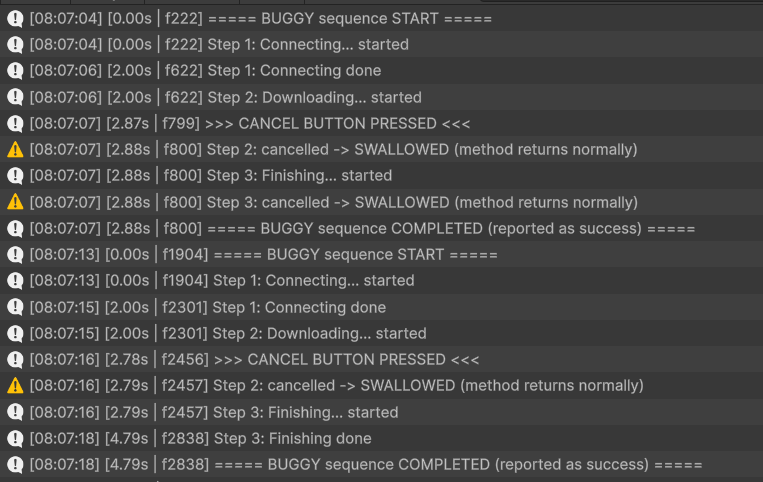
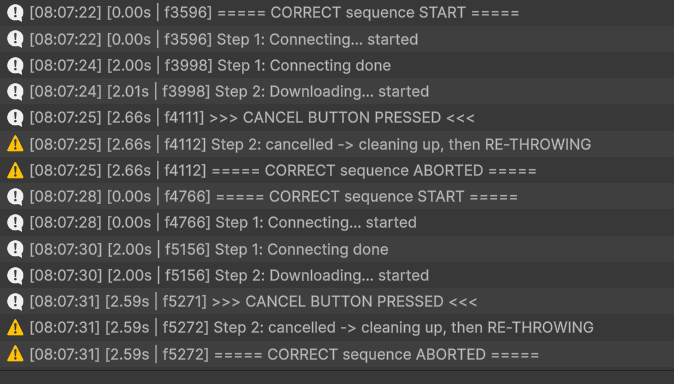
Run 2 is the clearest evidence. Step 3 logged “Finishing done” two full seconds after I pressed Cancel, and the sequence still reported success.
Runs 3 and 4 are identical. The checkbox makes no difference to the correct version, because Step 3 is never reached.
The buggy steps didn’t run slowly. They ran in a burst. In Run 1, Step 3 started, failed, and was swallowed in the same frame (f800). The sequence then reported COMPLETED in that same frame.
So the leak isn’t “the remaining steps take their normal time.” Every remaining step fires, fails and gets swallowed instantly. The exception is a step that ignores the token (Run 2), which really does run to completion.
My first buggy test hid the bug. On my first attempt, I happened to press Cancel during Step 3. There was no later step for the cancellation to leak into, so the only symptom was the false COMPLETED. The bug only became visible when I cancelled earlier in the chain. Where you cancel decides what you can observe.
Cancellation can’t undo a step that already started. Step 2 appears in both the buggy and correct logs, because it had begun before I pressed Cancel. What matters is what happens after the Cancel line.
In real code, the bug usually hides inside a general catch (Exception) written for network errors. Here, swallowing cancellation reported my Cancel button as a red error. The if (ct.IsCancellationRequested) throw; guard fixed that without changing how real errors were handled.
catch (Exception ex)
{
    if (ct.IsCancellationRequested) throw;   // the correct version adds only this
    LogError($"Step {step}: FAILED with {ex.GetType().Name} -> handled as error, continuing");
}
| Run | Version | Trigger | Result |
|---|---|---|---|
| A | Buggy | Cancel at 2.87s (f19565) | Step 2 and Step 3 logged as errors (OperationCanceledException) in f19566; COMPLETED |
| B | Correct | Cancel at 2.43s (f21526) | Step 2 re-thrown in f21527, no error logged; ABORTED |
| C | Buggy | step2ThrowsNetworkError | Step 2 error (InvalidOperationException) at 4.01s; Step 3 done at 6.01s; COMPLETED |
| D | Correct | step2ThrowsNetworkError | Same as C: Step 2 error at 4.01s; Step 3 done at 6.01s; COMPLETED |
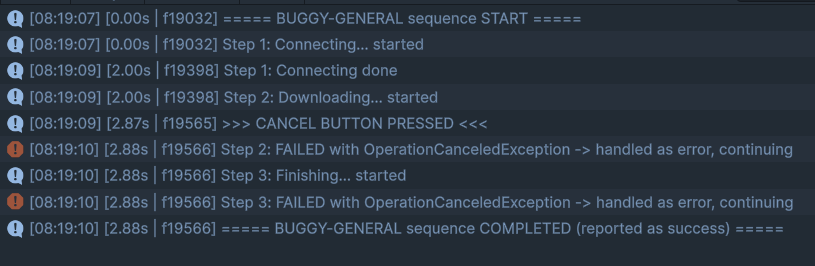
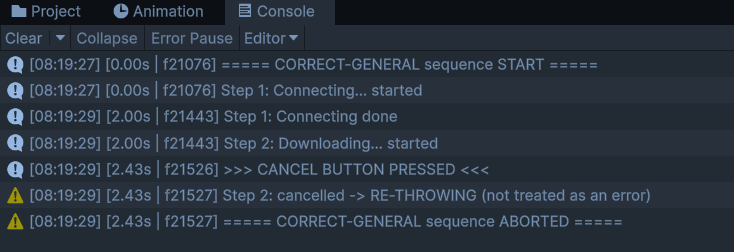
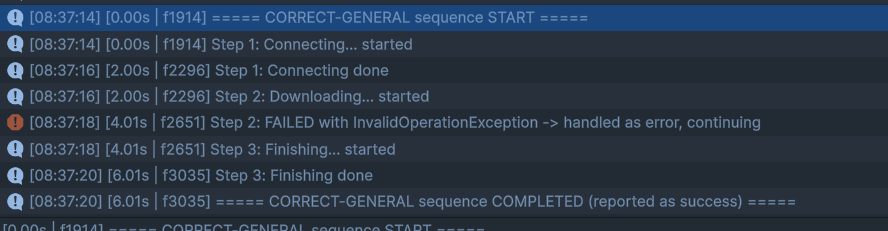
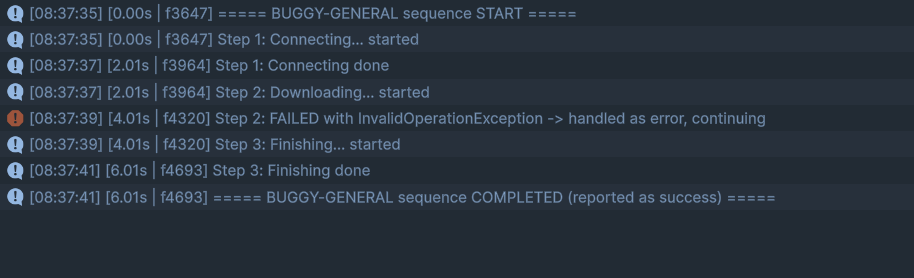
A and B differ; C and D are identical. The guard changes only what cancellation does. Genuine errors are still caught and handled, and COMPLETED is the intended outcome there, because the error was deliberately handled as a fallback.
Run A shows a new cost on top of the leak. Cancellation shows up as a failure, so in a real project it could trigger error dialogs, retry logic, or false crash reports.
catch (Exception), check the token first. if (ct.IsCancellationRequested) throw; lets cancellation through and leaves real error handling unchanged.if guard. I never produced an OperationCanceledException from a different token, such as a library timeout. The guard’s purpose there is reasoning, not something I observed.UniTask.WhenAll, SuppressCancellationThrow, and the cancelImmediately option on UniTask.Delay were out of scope.